Inactive Rainbow users

Hi,
we need to know if it is possible, through Rainbow Admin Console, to extract the users (extensions) that have not been active for a defined period of time.
There is the option to extract the total number of inactive users, but we need the users.
Thanks
Adrian
-

Hi Adrian,
Good day.
Thank you for your question.At the moment, the Rainbow Admin Console allows you to filter and export users based on general login activity, such as users who have never logged in or those who are already logged in. This can help identify inactive users to some extent.
However, it is not currently possible to filter or extract users based on a specific period of inactivity (e.g., users inactive for the last 30 or 60 days). The system does not offer a configurable date-based inactivity filter at this time.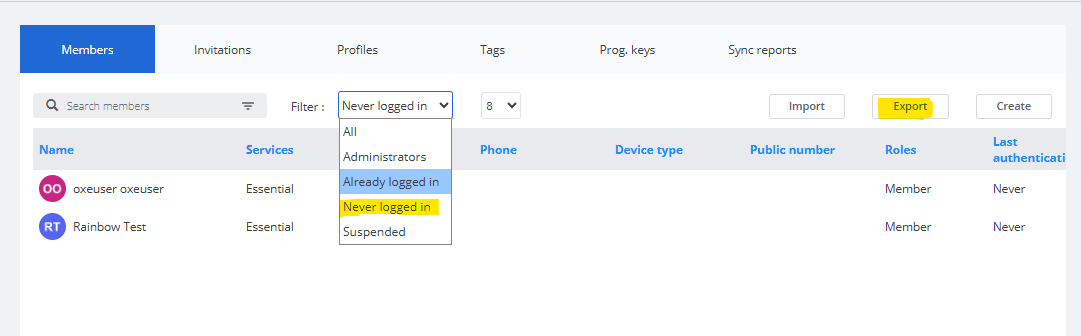
To extract the list, simply apply the desired filter, and then click Export to generate a file containing the filtered users and their associated data.
I hope this answers your question.
Regards,
Arjun CP
Rainbow TAC support. -
Hi Olivier,
Good day.
Thank you for your question.
Exporting filtered users, such as inactive users, is possible.
You can apply the filter to view inactive users in the interface, as shown below.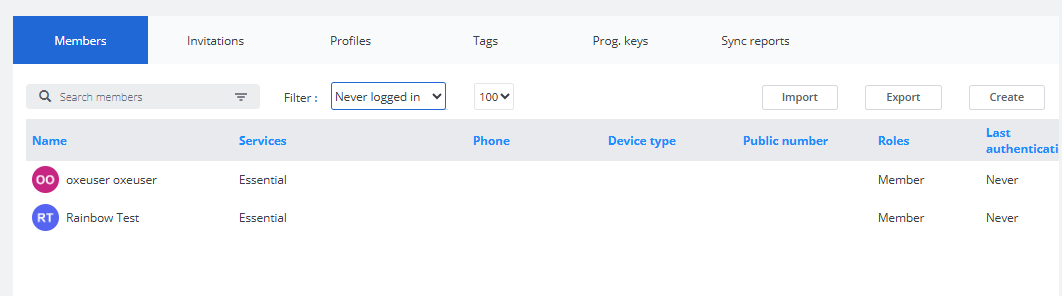 Once exported, the resulting CSV file will include only the filtered data—similar to the example provided below.
If you are experiencing any issues during the export process, we kindly request you to create a service request with us so we can investigate further and assist you accordingly.
Regards,
Arjun CP
Rainbow TAC support. -

Bonjour,
The answer from the ALE Support Team about the export:
-----------------------------------------------------------------------------
For performance reasons, user export is performed by the server without filters (except for Hybrid and Hub users). There are many possible filters and combinations. This request cannot be made without further development.
The exported CSV file can be opened in Excel: entries can be sorted and filtered by different fields. The number of users per page is currently limited to a maximum of 100.
Filtering a CSV file must be performed within the CSV file itself, not at file generation time.
Therefore, the issue reported here is considered a behavior improvement request and not a problem in itself.
-----------------------------------------------------------------------------
So, it's not possible to export filtered users
I have asked for the improvement
Bonne journée
Olivier

Bitte melden Sie sich an, um einen Kommentar zu hinterlassen.
Kommentare
6 Kommentare